Maintenance -
Boom adjustments
Outer fold rams
The second fold rams are part of a
complex folding mechanism, and should only be adjusted by a suitably
qualified person.
Outer
fold ram speed adjustment
The outer fold
rams are fitted with adjustable cushioning devices. At each end of
the travel of the ram the in-built cushions slow the folding down to
stop the boom slamming against the stops.
These are normally
factory pre-set but the adjustment is quite fine and they do tend to
go out of adjustment after a little while.
If the speed of
folding at the end of the stroke is too fast or too slow it can be
adjusted by one of two adjusters as shown on the picture below
|
The adjuster on the inner end of the ram (A) adjusts the speed as the boom is folding out to its fully open position. It has no effect on the speed of the ram as it folds in. The adjuster on the outer end of the ram (B) adjusts the speed as the boom is folded in on to its rests. It has no effect on the speed of the booms as they fold out. |
|
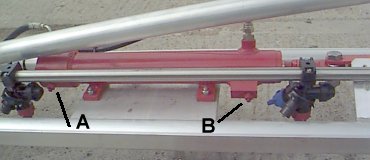 Outer
boom fold ram cushioning adjusters
Outer
boom fold ram cushioning adjusters
To adjust the
speed/cushioning effect insert an allen key into the appropriate grub
screw and hold it still. Slacken off the locknut and move the allen
key 1/8th of a turn - clockwise to slow down, anticlockwise to speed
up. Hold it still again while you tighten the locknut. Then try the
boom folding - If it is not right repeat above procedure until it is.
Do not speed
the boom folding up faster than the original factory settings or
serious boom damage can result.
|
Main lift ram
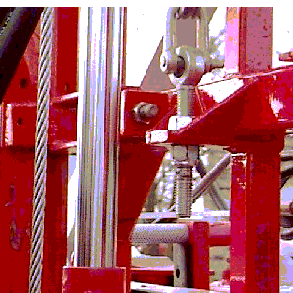
The main lift ram relies on a wire
rope to lift the boom, after a while this may stretch and the back
frame will not travel all the way to the top of the height mast.
It is easily adjusted by shortening
the threaded eye bolt shown on the right.
|
|