Operating - Cab controls
Cab controls
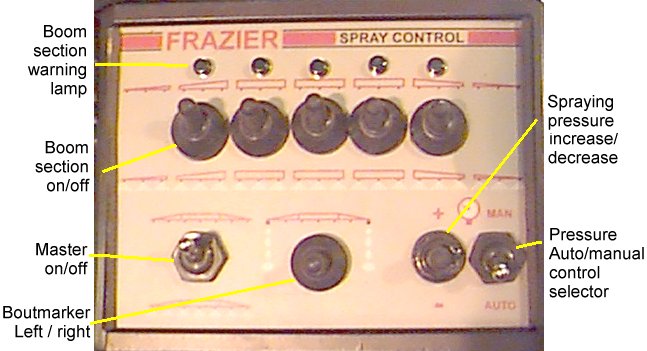
Master on/off
The main sprayer on/off switch is
situated in the lower left corner of the sprayer control panel (see
above). Push the switch down to start spraying and up to stop
spraying. This switch is normally connected to an RDS area meter to
stop area being accumulated whilst turning on headland. It is also
connected to the four wheel steering system (if fitted) and (if
selected) automatically activates four wheel steer when spray lines
are switched off, e.g. when turning.
Pressure auto/manual
select switch
If an automatic sprayer control
system is fitted this switch must be switched down to the Auto
position for the auto control system to work. In this position the
manual pressure control switch on the panel is disabled. With the
switch in the MAN position the automatic pressure control will
be disabled but the manual pressure control switch on the panel will
be enabled (see below)
Pressure control
The spraying pressure can be
altered from the sprayer control panel, Push the switch up to
increase pressure and down to decrease pressure. The pressure can be
monitored with the pressure gauge mounted in front of the cab windscreen.
Boom section controls
The sprayer may be fitted with up
to 7 boom sections. To stop an individual boom section spraying push
the appropriate switch to off and to start it again push the switch
to on. Warning lights next to the boom section switches will indicate
whether a section is spraying or not (see above). The master on/off
switch will override all the boom section controls.
The boom section switches may be
connected to the RDS area meter for more accurate area recording if
an "Area Compensation Interface" is fitted (see tractor
unit manual).
Bout marker control
If a factory fitted bout marker is
fitted, it is operated by a two way switch on the sprayer control
panel (fig. 1). Depress the switch to the left to activate the left
hand side, and to the right for the right hand side. Warning lights
next to the switch indicate which side is in use.