Operating - ICM programming
22/  Handbrake / Low brake fluid warning light This
warning light will be illuminated at all times if the handbrake is
on or if the brake fluid is low. An audible alarm will also sound if
the machine is moving.
Handbrake / Low brake fluid warning light This
warning light will be illuminated at all times if the handbrake is
on or if the brake fluid is low. An audible alarm will also sound if
the machine is moving.
23/  Main beam warning light This warning light
will be illuminated when the headlights are set to main beam.
Main beam warning light This warning light
will be illuminated when the headlights are set to main beam.
24/  Indicator warning light This warning light
will flash and an audible beep will sound in conjunction with the
direction indicators and hazard warning flashers.
Indicator warning light This warning light
will flash and an audible beep will sound in conjunction with the
direction indicators and hazard warning flashers.
Programming
There are various
inputs which must be programmed into the ICM relating to the machine
and the sensors installed. The majority of these inputs are factory
preset and cannot be altered by the operator.
The input data
that can be altered by the operator can only be viewed or changed
when the ICM is changed from its normal "Operating mode" to
its "Programme mode"
A front panel
overlay card is provided which indicates the new "programme
mode" functions of each of the buttons along the bottom of the instrument.
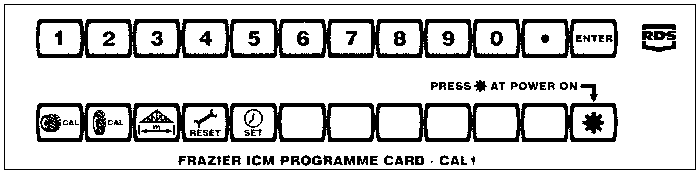
The ICM Overlay Card
Entry into programme mode
a/ Select either
Metric or Imperial on the instrument according to which units you
wish to use for programming and then switch the ignition off.
b/ Position the
overlay card on the front panel of the instrument over the function buttons.
c/ Press and hold
down the * button whilst switching the ignition back on.
d/ The LH display
will show "CAL1" to confirm that the ICM is in
programme mode. The * button should be released immediately
that "CAL1" is displayed.
e/ The functions
of all the lower buttons have all now changed to those indicated by
the overlay card. The LH display will show the value of any of these
factors currently set in the instrument simply by pressing the
appropriate function button.
f/ The upper row
of buttons (immediately below the displays) have also changed to
become data entry keys having values of 1 to 9, 0, decimal point and ENTER.